Best eSIM for Bali from Australia (2026): 4 providers compared
Flying from Australia to Bali? This guide compares four eSIM providers and covers keeping your Australian number active, setting up before departure, and choosing a data allowance for your trip. For a broader comparison that also includes MobiMatter, Ubigi, and Maya, see our best eSIM for Bali guide.
Quick Comparison: Top Bali eSIMs for Aussie Travelers
For Australian travelers, the ideal Bali eSIM must offer Telkomsel network coverage (essential for regional spots like Uluwatu, Ubud, and Nusa Penida), hotspot sharing, zero ID verification (eKYC), and instant activation upon arrival.
Below is a direct comparison of the top Bali eSIM providers for Aussies in 2026:
| Feature / Provider | esimNB | Airalo (Mensahe) | Nomad | Holafly |
|---|---|---|---|---|
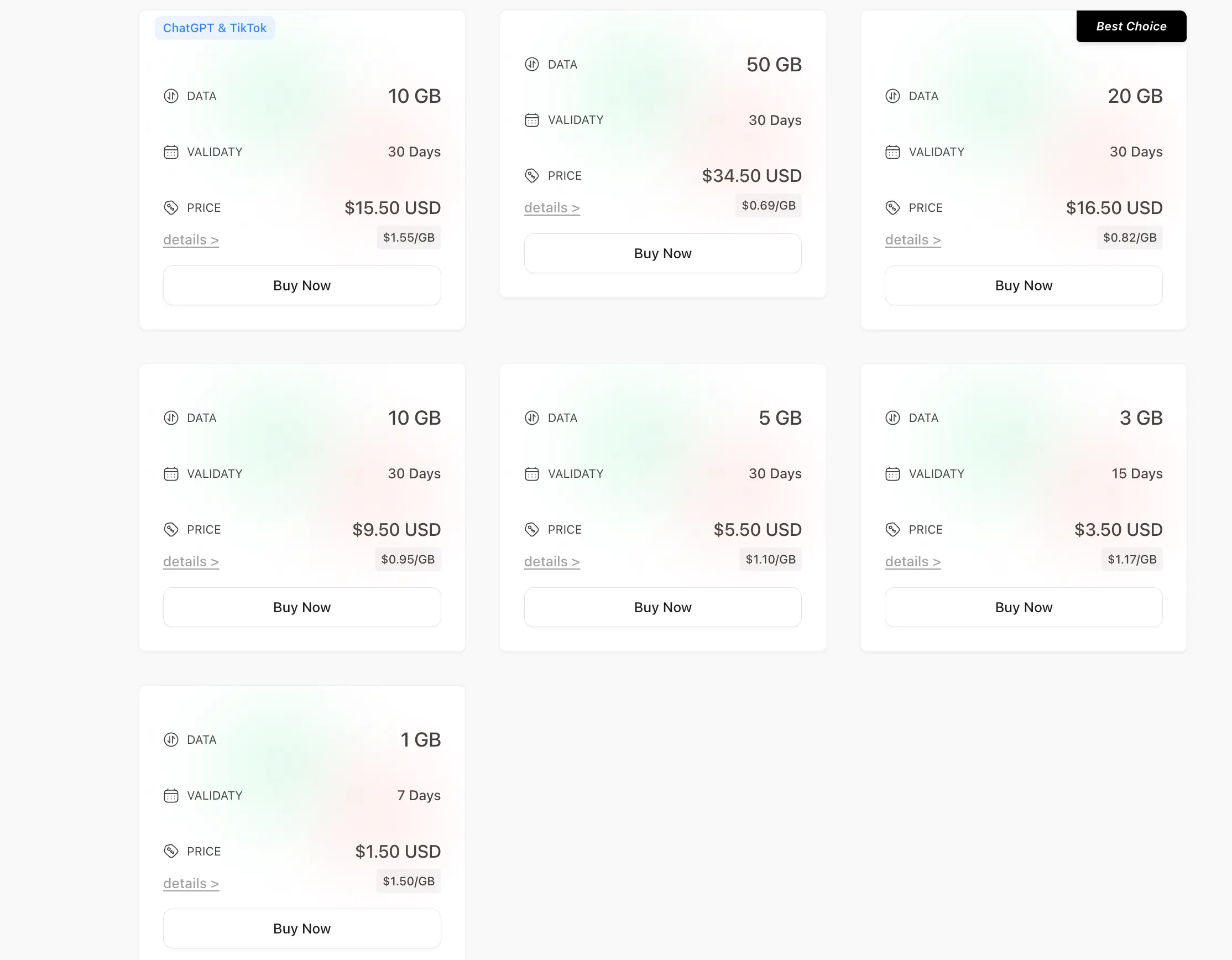
| Price (10GB / 30 Days) | $9.50 USD (~$14.20 AUD) | $21.00 USD (~$31.50 AUD) | $19.00 USD (~$28.50 AUD) | N/A (Unlimited only: ~$50+ AUD/10 days) |
| Best Value Plan (20GB) | $16.50 USD (~$24.80 AUD) | $40.00 USD (~$60.00 AUD) | $35.00 USD (~$52.50 AUD) | N/A |
| Entry Plan | $1.50 USD / 1GB (7 Days) | $5.50 USD / 1GB | $4.00 USD / 1GB | $19.00 USD (1 Day Unlimited) |
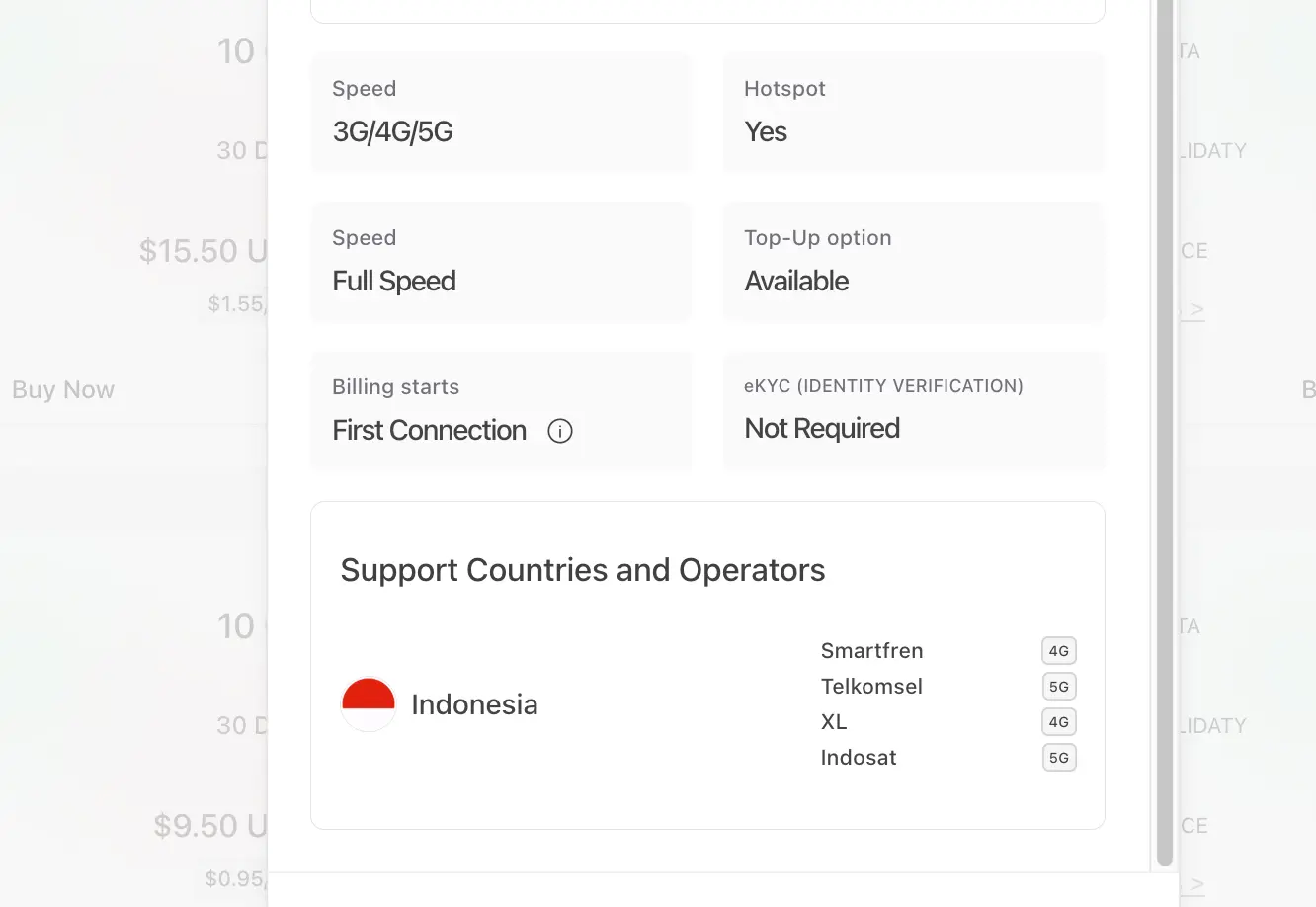
| Primary Local Networks | Telkomsel (5G) & Indosat (5G) | Telkomsel (4G) / XL | Indosat / XL | XL / Smartfren |
| Data Speeds | Full Speed 3G/4G/5G | 4G LTE | 4G LTE | Throttled after daily cap |
| Hotspot / Tethering | Yes (Supported) | Yes | Yes | No / Heavily restricted |
| Identity Check (eKYC) | Not Required | Not Required | Not Required | Not Required |
| Validity Start | First Connection in Bali | First Connection | First Connection | First Connection |
| Top-Up Available | Yes | Yes | Yes | No |
Key Takeaway for Aussie Travelers
- Best Value & Coverage Overall: esimNB provides native Telkomsel 5G and Indosat 5G dual-network access without requiring passport scans or complex registration. At $16.50 USD (~$24.80 AUD) for 20GB, it costs less than half of traditional travel eSIM competitors and a fraction of Aussie telco roaming passes.
- Flexibility: With instant top-ups, full hotspot capabilities, and billing that only begins when you connect to a local Indonesian cell tower, you can safely install the eSIM while waiting at the airport in Australia without burning valid days.
What Makes a Bali eSIM "Best" for Australian Travelers?
Australian travelers have specific connectivity needs that general tourist guides often overlook. Choosing the right eSIM isn't just about getting cheap gigabytes—it’s about ensuring seamless banking access, skipping airport bureaucracy, and securing reliable signals across Bali’s beach clubs and rural valleys.
1. Zero-Roaming Dual-SIM Setup (Keep Your AU Number Active for 2FA)
When spending in Bali, major Australian banks—such as CommBank, Westpac, ANZ, and NAB—frequently send One-Time Passwords (OTP) via SMS to verify online payments or app logins.
If you remove your Aussie physical SIM, you risk getting locked out of your financial accounts. On the flip side, leaving your Aussie line active can accidentally trigger Telstra’s $10/day Day Pass or Optus’s $5–$10/day Roaming Pass.
Before setting up your two lines, our guide to how data roaming works explains what the roaming setting controls. For your Bali trip, use this Dual-SIM configuration:
- Primary AU Line: Kept ON with Data Roaming turned OFF (receives incoming Aussie bank 2FA SMS for free without triggering daily roaming charges).
- Bali Travel eSIM: Kept ON with Data Roaming turned ON (handles 100% of local mobile data).
2. Native Access to Telkomsel & Indosat 5G Networks
Network coverage in Bali varies drastically depending on the local infrastructure provider.
- Telkomsel is Indonesia’s state-owned flagship operator, offering the most extensive coverage in high-density hubs like Canggu, Seminyak, and Uluwatu, as well as offshore spots like Nusa Penida and Lembongan.
- Indosat Ooredoo provides high-speed 5G performance across tourist centers and city regions.
Discount eSIM providers often route data through lower-tier carriers like XL or Smartfren, leading to dead zones inside concrete cafes or remote beach clubs. Look for an eSIM that connects natively to Telkomsel and Indosat 5G for maximum speed and uptime.
3. No Identity Checks (Zero eKYC Registration)
Indonesia strictly enforces foreign device IMEI registration and passport verification for physical SIM cards purchased at Denpasar (DPS) Airport or local street stalls. This process often involves:
- Standing in long, humid airport queues after an international flight.
- Handing over physical passport scans to third-party vendors.
- Paying inflated tourist prices (often 200–300% higher than standard rates).
A top-tier travel eSIM requires no eKYC (Identity Verification). You simply purchase online, scan the QR code before flying out from Sydney, Melbourne, or Perth, and activate upon landing. If you use an iPhone, follow our eSIM installation and activation guide for the QR code setup and mobile data settings.
4. Full Hotspot & Tethering Support
Whether you need to log into a quick laptop session at a Canggu co-working cafe or share internet with family members during a day tour to Bedugul, your eSIM must support unrestricted personal hotspot sharing. Certain unlimited data providers silently throttle or block tethering altogether—ensure your chosen package offers full-speed hotspot allocation.
Recommended eSIM Plans Based on Your Bali Trip
Every trip to Bali looks a little different—a quick 4-day weekend fly-in from Perth requires vastly different connectivity than a month-long digital nomad stint in Canggu. Matching your data package to your travel style ensures you never overpay for unused data or get stranded without maps.
Here is how to select the ideal esimNB plan based on your itinerary:
1. The Perth Quick Getaway (3–7 Days)
- Best For: Short beach escapes, long weekends, or brief stopovers flying direct from Western Australia.
- Recommended Package: 3GB (15 Days) for $3.50 USD ($5.25 AUD) or 5GB (30 Days) for $5.50 USD ($8.25 AUD).
- Usage Profile: Perfect for essential Google Maps navigation, booking Grab/Gojek rides, sending WhatsApp messages, and casual social media updates.
2. The Classic Aussie Holiday (10–14 Days)
- Best For: The standard 2-week vacation from Sydney, Melbourne, or Brisbane covering Seminyak, Ubud, Uluwatu, and Nusa Penida.
- Recommended Package: 10GB (30 Days) for $9.50 USD ($14.25 AUD) or 20GB "Best Choice" (30 Days) for $16.50 USD ($24.80 AUD).
- Usage Profile: Ideal for daily Instagram stories, streaming music on scooter rides, uploading beach club photos, continuous GPS navigation, and sharing a hotspot with a travel partner.
3. The Canggu Remote Worker & Long Stay (30 Days)
- Best For: Digital nomads, workations, or extended retreats staying in villa rentals across Bali and the Gili Islands.
- Recommended Package: 50GB (30 Days) for $34.50 USD ($51.75 AUD).
- Usage Profile: Designed for heavy data users who need to tether laptops for remote work, host video calls when cafe Wi-Fi drops out, and stream HD movies without data anxiety.
What If You Run Out of Data Mid-Trip?
If you end up using more data than expected while exploring Bali, esimNB supports instant Top-Ups. You don't need to scan a new QR code or reconfigure device settings—simply top up your existing eSIM profile online to extend your balance instantly on Telkomsel/Indosat 5G.
Frequently Asked Questions (for Aussie Travelers)
Q1: Can I keep my Aussie WhatsApp number while using a Bali eSIM?
Yes. WhatsApp is linked to your app account, not your temporary data connection. Once installed, open WhatsApp as usual. If prompted by WhatsApp to switch to a new phone number, select "Keep Existing Number". All your chats, groups, and contact lists will remain completely unchanged.
Q2: Will my eSIM plan start its validity period while I am still in Australia?
No. Billing and validity countdowns for esimNB plans only start upon First Connection to an Indonesian mobile network (Telkomsel, Indosat, Smartfren, or XL). You can safely purchase and scan your QR code at home or while waiting at the airport in Australia (Sydney, Melbourne, Perth, etc.) without losing any active days.
If the installed travel line shows no signal before departure, our guide to no signal after activating an eSIM explains how to distinguish being outside the service area from a connection problem after arrival.
Q3: Do I need to register my passport or submit eKYC photos?
No. Unlike buying physical SIM cards at Denpasar (DPS) airport or local kiosks—which require passport scans, IMEI device registration, and long queues—esimNB Bali eSIMs require zero eKYC identity verification. Your data profile works immediately upon landing.
Q4: Can I use personal hotspot and tethering to my laptop or iPad?
Yes. All esimNB Bali packages support full personal hotspot tethering without speed throttling. You can seamlessly connect laptops, tablets, or share internet with family members while traveling across Bali.
Q5: What cellular networks will my phone connect to in Bali?
Your eSIM automatically connects to Indonesia’s top-tier networks, including Telkomsel (5G) and Indosat (5G), as well as XL (4G) and Smartfren (4G). In high-density tourist areas like Canggu, Seminyak, or Uluwatu, it will prioritize high-speed 5G coverage.
Q6: What should I do if I run out of data mid-trip?
If you burn through your data allowance early, you can purchase an instant Top-Up directly on the esimNB website. Your existing eSIM profile will automatically refill—there is no need to delete the profile or scan a new QR code. If your connection does not resume after topping up, follow the steps for an eSIM not working after adding data.
A Chinese traveler and adventurer with a deep passion for exploring the world. As an INFJ, he is naturally curious about new experiences, cultures, and ideas. At esimNB, he is responsible for customer support and technical assistance, maintaining close communication with users while sharing practical travel tips and helpful eSIM guides. His life motto is: Be confident, effortless, courageous, and authentic.
Congrats 🥳
You've unlocked your exclusive 15% discount
Select eSIM Plan